
Which TimePlan plan should you choose: Free, Mini or Base?
TimePlan has three main plans: Free, Mini and Base. They differ in both price and the features available to your company.
You do not need to study every row of the pricing table to choose a plan. This guide compares the main options, shows the cost at different booking volumes and explains when each plan makes sense.
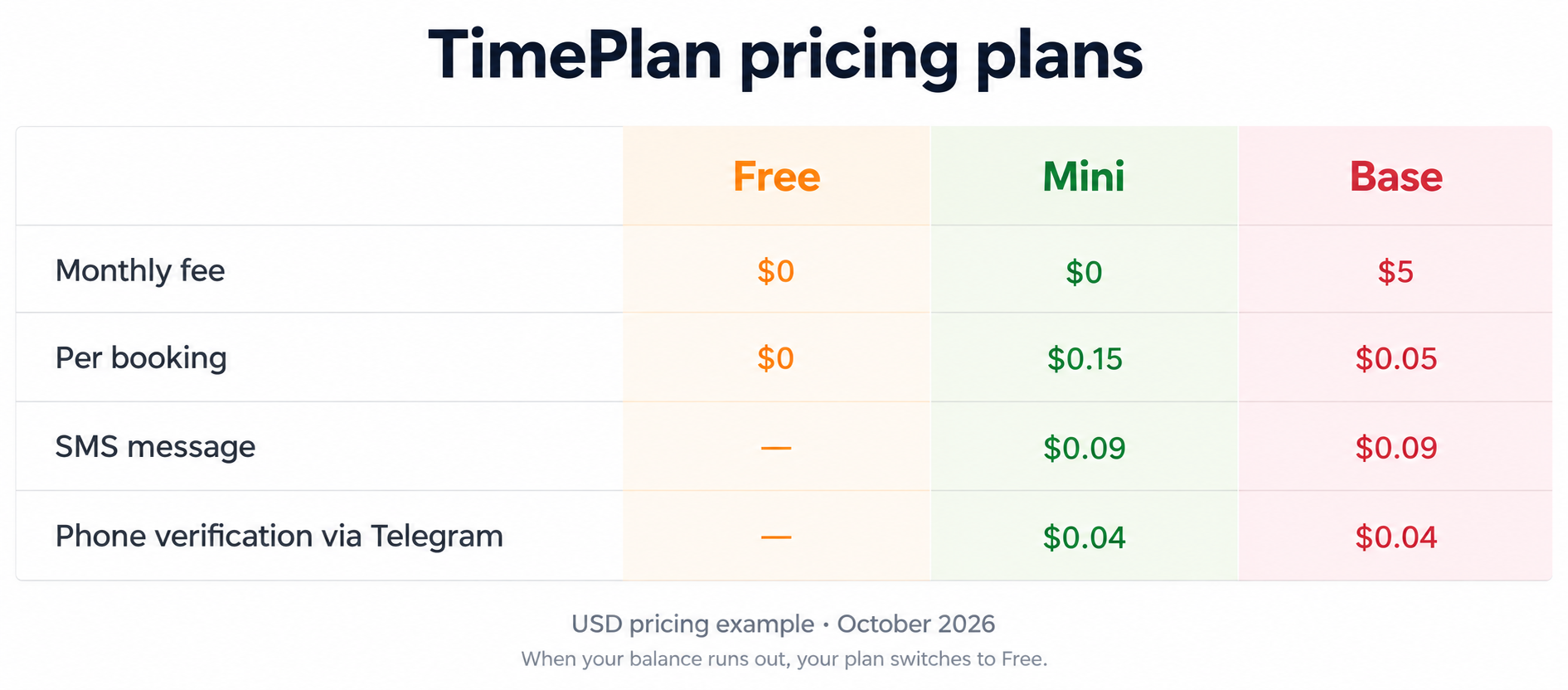
The examples below use the USD prices displayed on TimePlan on October 1, 2026. Prices, currency and some features depend on your country. Before switching, check the current Prices page and the rates shown in your company's Finance section.
The short answer
Free is a good starting point if you need the essentials: a calendar, online booking, services and a client database. There is no monthly fee or per-booking charge, and the number of bookings is not limited.
Mini suits a small or irregular flow of clients. There is no monthly subscription fee; you pay for the bookings you create.
Base becomes less expensive at higher booking volumes. It has a monthly fee, but a lower charge for each booking. With the USD rates used here, Base costs less once you create more than 50 bookings per month.
If you need paid features but do not yet know your booking volume, Mini is a practical starting point. You can change plans later.
How the plans differ in practice
Start by deciding whether you need paid features at all.
Free includes most everyday tools: unlimited bookings and services, client profiles, reports, no-show tracking, time zones, flexible working hours, website integration, a WordPress plugin, a personal booking-page address and technical support. The pricing table lists up to 200 calendars per company.
Email and browser Push notifications are also free. The FAQ explains which reminders clients can receive.
The paid plans add features such as:
- SMS reminders and booking verification, including the option to send SMS through your own Android phone;
- passes, group bookings and services that book two specialists at the same time;
- custom SMS and email templates;
- booking pages without advertising;
- synchronization with external calendars and additional verification methods where available.
Available phone-verification methods depend on your country. Check the options shown for your company.
Mini and Base have the same paid feature set. The difference is how you pay: Mini has no monthly fee and a higher per-booking charge; Base has a fixed monthly fee and a lower charge per booking.
What 30, 50 and 300 bookings cost
For the USD example:
- Mini: $0 per month + $0.15 per booking;
- Base: $5 per month + $0.05 per booking.
| Bookings per month | Mini | Base | Lower cost |
|---|---|---|---|
| 30 | $4.50 | $6.50 | Mini saves $2.00 |
| 50 | $7.50 | $7.50 | The same |
| 300 | $45.00 | $20.00 | Base saves $25.00 |
The break-even point is 50 bookings per month. Below that, Mini costs less. Above it, Base costs less.
The calculation is:
$5 ÷ ($0.15 − $0.05) = 50 bookings
These totals include the plan fee and booking charges. Paid messages and verification are separate.
The charge is based on bookings, not unique clients. One person who books four visits creates four bookings.
If your workload varies substantially, consider both your usual volume and your quieter months. Base's monthly fee applies even when few bookings are created, so Mini can be cheaper during a quiet period.
Separate charges: SMS and phone verification
Some communication and verification methods have their own charges on paid plans.
The USD pricing example lists:
- SMS: $0.09 per message, for a verification code or reminder;
- phone verification via Telegram: $0.04.
Available methods and rates depend on the country selected for your company. The Free plan does not include these paid messaging options.
There are also ways to send reminders without paying TimePlan for each SMS:
Browser Push notifications are free on every plan. The client grants permission in a supported browser to receive notifications.
Your own Android phone can act as an SMS gateway on a paid plan. TimePlan does not charge for sending through this gateway, but your mobile carrier's SMS charges still apply.
CAPTCHA and email are available as free booking-verification methods. Check the Prices page for other methods and their availability.
What happens when your balance runs out?
If your company balance runs out, the account automatically switches to Free. Your calendar, existing bookings, client database and main settings remain available. Clients can continue using the basic online-booking features, while paid features are disabled.
After you top up the balance, the service automatically restores the previous paid plan.
While the account is on Free, paid SMS reminders and paid phone-verification options are unavailable.
You can enable a low-balance notification under Settings → Notifications.
Can you change plans?
Yes. You can change plans yourself at any time.
Open Finance. The Financial information section shows your current plan, the booking rate, your balance and the available plan changes.
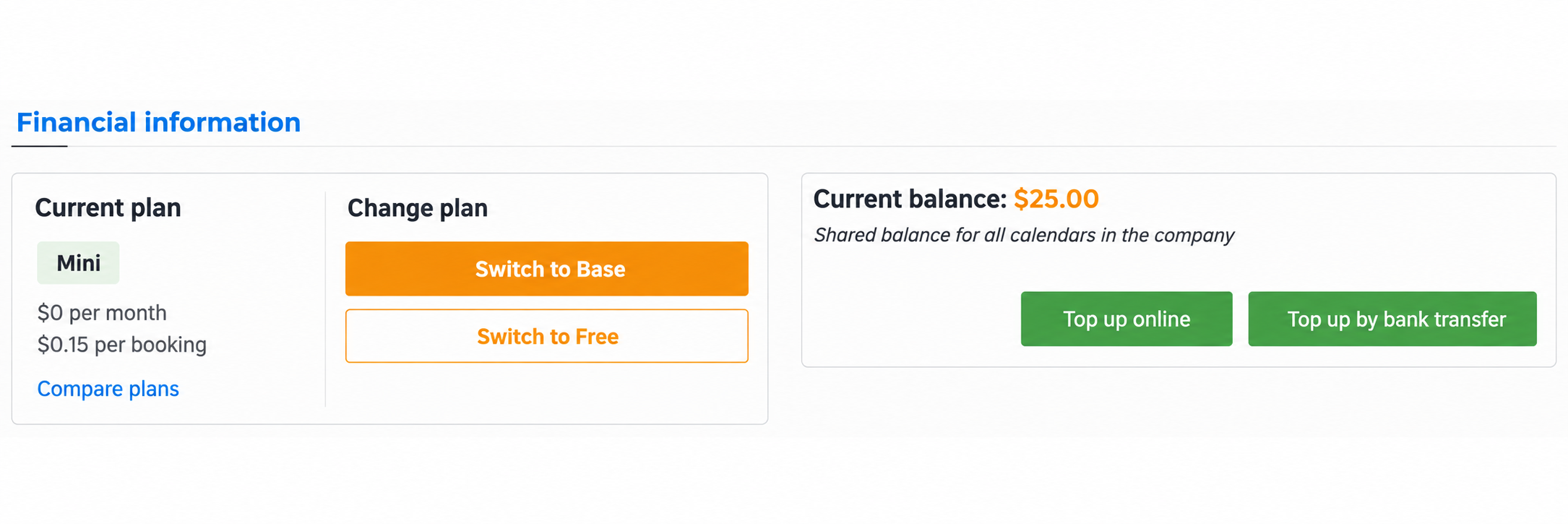
Example account balance: $25.00.
The change takes effect immediately, without a request to support.
You need a positive account balance to switch to a paid plan. If the balance is zero, top up first. You can switch from a paid plan to Free whenever you choose.
The USD pricing page advertises a $5 sign-up credit. Check the current offer when registering; it can help you try paid features before deciding which plan suits your workload.
A simple way to decide
- Do you need SMS, passes, group bookings or other paid features? If not, Free may cover your needs. If you do, choose a paid plan.
- How many bookings do you create each month? At the USD rates above, Mini is cheaper below 50 bookings, both cost the same at 50, and Base is cheaper above 50.
- Not sure about your volume yet? Start with Mini if you need paid features. It has no monthly fee, and you can switch to Base later.
Things to keep in mind
Base has a monthly fee. It applies regardless of how many bookings you create.
Count bookings, not clients. A regular client may make several bookings in one month.
Mini and Base offer the same paid features. Compare their costs at your expected booking volume.
The balance belongs to the whole company. All its calendars and specialists use that balance.
Phone-verification methods vary by country. Check which options are available for your company.
The 50-booking threshold depends on the rates. If prices change, calculate it again: monthly fee ÷ difference in the per-booking charges. Use the rates on the Prices page and in your company's Finance section.